Building an Adhoc Report
Within both Standard and Enhanced Reporting, you can click on Build Custom Report to create a custom analytics report.
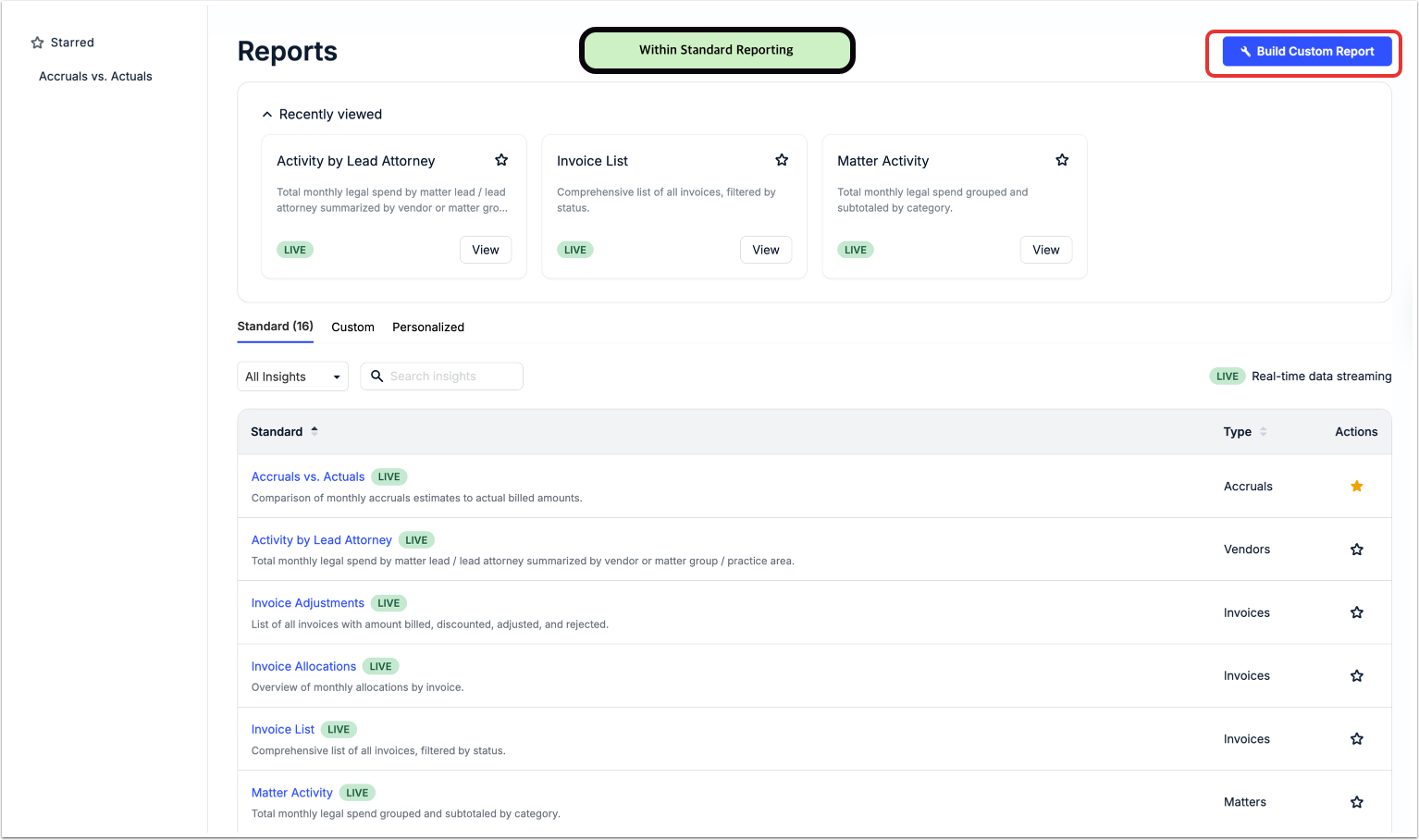
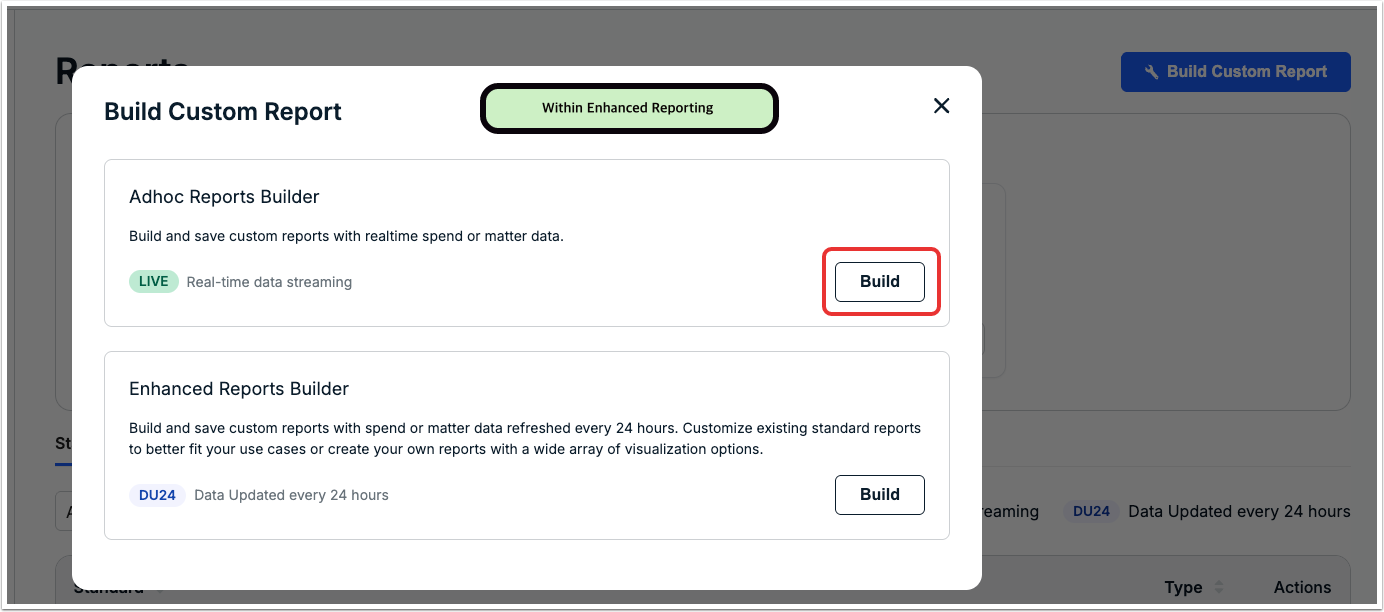
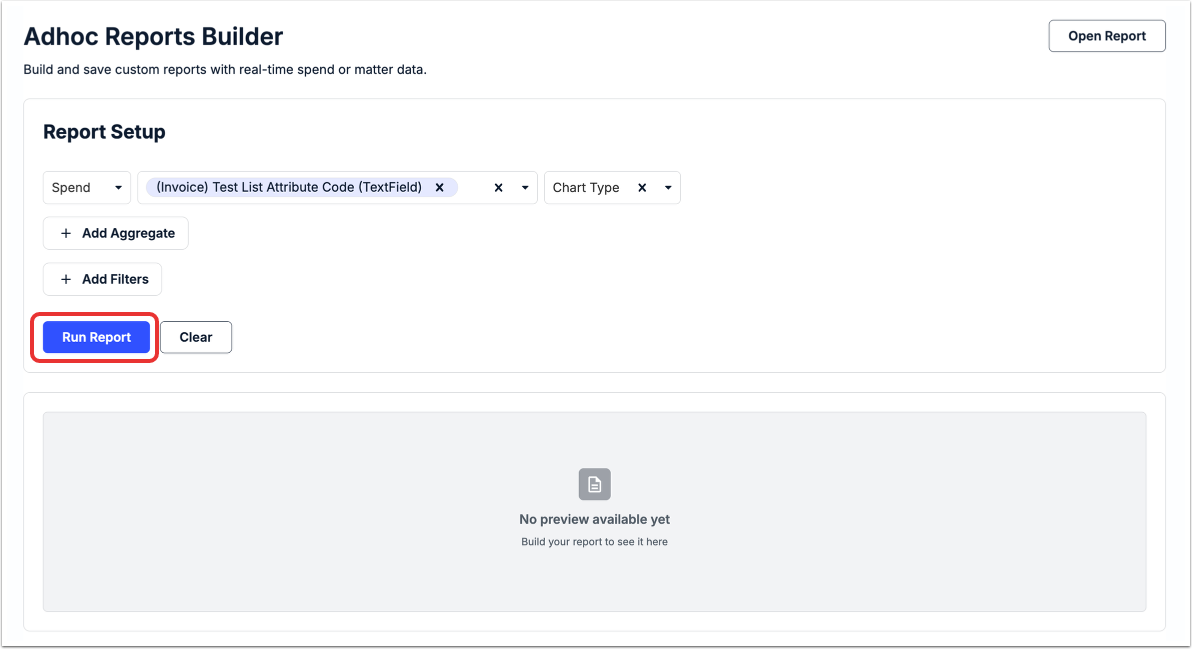
Once you click that button, you'll get to the Adhoc Reports Builder screen. Here, you can build and save custom reports with real-time spend or matter data.
To build your report, you can:
- Select the type (Spend, Matters), the Data Columns, and the Chart Type from the drop-down menus. Click the X on the left side of a selected column name to remove it.
- Add Aggregate elements from the drop-down menus (Function, Columns). Repeat the above until you have added the desired aggregates. Each aggregate will appear as a column in the results once you run the report. To remove an aggregate before running the report, click thex.
- Add Filters (Column, Value). Select an operator from the drop-down list and then enter a value. For example, if you want to filter on one value OR another value, use the IN operator and separate each value with a comma. Repeat the above until you have added the desired filters. To remove an aggregate before running the report, click the X.
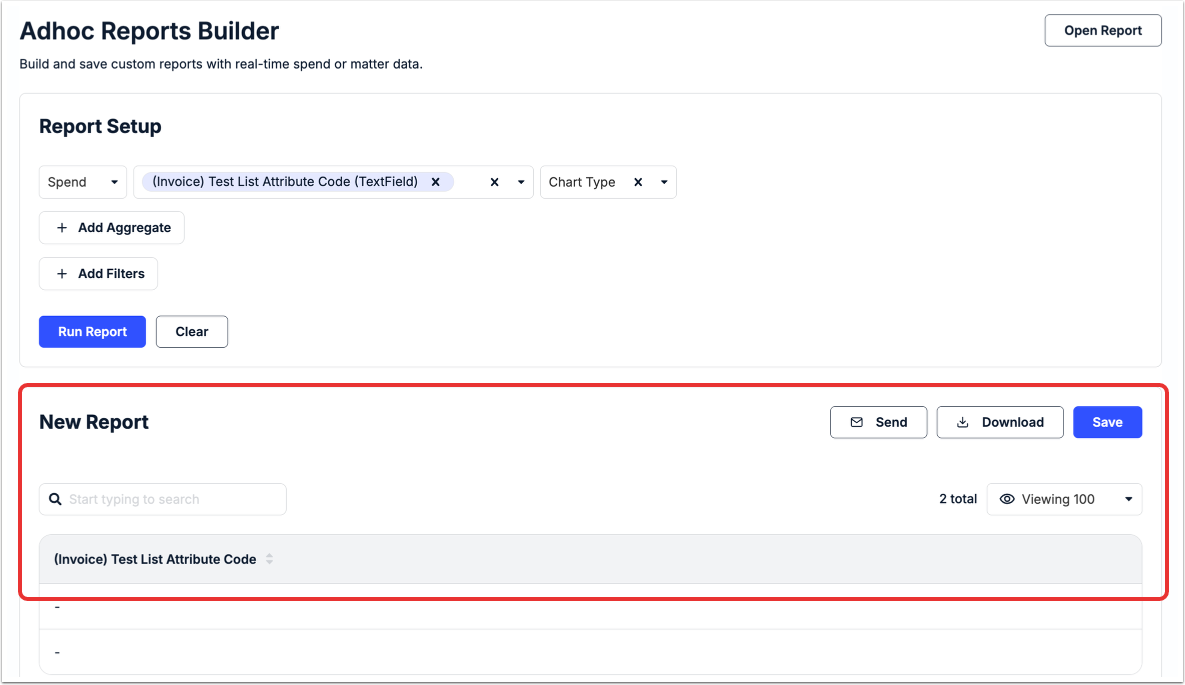
Click Run Report to run the report or Clear to clear your information. A Preview of your report will appear on the bottom of the screen; you can use the Search bar to search through that report, use the drop-down menu to choose what is seen on the screen, Send it to a contact, Download the information, or Save it for the main report database.
What to Know about Ad Hoc Reports
Adding Aggregates
Aggregate refers to how data for a specific column is counted or otherwise calculated. You can select from the following aggregate functions:
- Sum- returns the sum of the numeric values
- Average- returns the average value
- Count- returns the total number of values
- Minimum- returns the smallest value
- Maximum- returns the largest value
For example, the Sum of the Final Amount column returns the net total for each invoice line item in the report.
NOTE: Aggregates will be applied to the lowest level in the data columns selected. For example, if you request the Matter Name and Sum of Final Amount, the report will return the net total of all the line items across all invoices for each matter in the report (i.e., one row per matter). If, on the other hand, you request Matter Name AND Invoice Number, the Invoice Number is considered the lowest level of data and Sum of Final Amount will return the net total of all line items for each invoice.
Adding Filters
Using filters to narrow the data results will make the information more manageable and easier to use. For example, see only data for a fixed date range, a specific vendor, or a handful of matters.
A filter is created by selecting a column name, selecting an operator (i.e., criteria for including or excluding data), and entering a value. For examples, you can exclude results attached to a specific Matter Group by selecting Matter Group as the column name, selecting not equal to as the operator, and entering the specific Matter Group name.
You can choose from the following operators: equal to, not equal to, in, not in, less than, greater than, less than or equal to, greater than or equal to, contains, starts with, ends with, is blank, or is not blank.
Available Data for Ad Hoc Reporting
See below for standard data columns that can be used to display information, add aggregates, and set up filters for Adhoc Reports.
| Data Column | Report Type | Description |
| (Invoice) [Custom Attribute Name] | Spend | If applicable, naming convention of custom attributes scoped to invoice records and of one of the following types: list, text, text area, currency, or yes/no. For example, (Invoice) Project Type. |
| (Legal Entity) [Custom Attribute Name] | Spend | If applicable, naming convention of custom attributes scoped to legal entity records and of one of the following types: list, text, text area, currency, or yes/no. For example, (Legal Entity) Division. |
| Matters | ||
| (Matter) [Custom Attribute Name] | Spend | If applicable, naming convention of custom attributes scoped to matter records and of one of the following types: list, text, text area, currency, or yes/no. For example, (Matter) Case Manager. |
| Matters | ||
| (PO) [Custom Attribute Name] | Spend | If applicable, naming convention of custom attributes scoped to purchase orders and of one of the following types: list, text, text area, currency, or yes/no. For example, (Matter) Case Manager. |
| Matters | ||
| (Spend) [Custom Attribute Name] | Spend | If applicable, naming convention of list-type custom attributes that are set as allocatable and scoped to invoices, matters, vendors, purchase orders, and/or legal entities. |
| (Vendor) [Custom Attribute Name] | Spend | If applicable, naming convention of custom attributes scoped to vendor records and of one of the following types: list, text, text area, currency, or yes/no. For example, (Matter) Case Manager. |
| Matters | ||
| Activity Code | Spend | Alphanumeric code that classifies the type of activity for a line item. Typically prefixed with the letter 'A' based on LEDES UTBMS. |
| Bill to Legal Entity | Matters | Name of Legal Entity to which invoices can be billed for a matter. |
| Bill to Legal Entity Description | Matters | Description of Legal Entity to which invoices can be billed for a matter, if provided. |
| Client Matter ID | Spend | System-generated numeric or alphanumeric ID assigned when a matter is created. |
| Matters | ||
| Cost Code | Spend | Name that represents the organization(s) to which costs may be allocated or charged for accounting purposes. May appear as a different term, such as Charge Number, depending on custom label settings. |
| Cost Code Code | Spend | Accounting code assigned to a Cost Code. |
| Expense Code | Spend | Alphanumeric code that classifies the type of expense for a line item. Typically prefixed with the letter 'E' based on LEDES UTBMS. |
| Invoice Approved Month | Spend | Year and month an invoice was approved. Displayed in YYYY-MM format. |
| Invoice Approved Quarter | Spend | Year and quarter an invoice was approved. Displayed in YYYY-QX format. |
| Invoice Approved Year | Spend | Year an invoice was approved. Displayed in YYYY format. |
| Invoice Date Quarter | Spend | Year and quarter an invoice was generated by a vendor. Displayed in YYYY-QX format. |
| Invoice Date Year | Spend | Year an invoice generated by a vendor. Displayed in YYYY format. |
| Invoice Date Year Month | Spend | Year and month an invoice was generated by a vendor. Displayed in YYYY-MM format. |
| Invoice Number | Spend | Number or ID assigned by a vendor to an invoice. |
| Invoice On Hold Month | Spend | Year and month an invoice was put on hold in Unity. Displayed in YYYY-MM format. |
| Invoice On Hold Quarter | Spend | Year and quarter an invoice was put on hold in Unity. Displayed in YYYY-QX format. |
| Invoice On Hold Year | Spend | Year an invoice was put on hold in Unity. Displayed in YYYY format. |
| Invoice Paid Month | Spend | Year and month an invoice was marked as paid in Unity. Displayed in YYYY-MM format. |
| Invoice Paid Quarter | Spend | Year and quarter an invoice was marked as paid Unity. Displayed in YYYY-QX format. |
| Invoice Paid Year | Spend | Year an invoice was marked as paid in Unity. Displayed in YYYY format. |
| Invoice Posted to AP Month | Spend | Year and month an invoice was posted to AP. Displayed in YYYY-MM format. |
| Invoice Posted to AP Quarter | Spend | Year and quarter an invoice was posted to AP. Displayed in YYYY-QX format. |
| Invoice Posted to AP Year | Spend | Year an invoice was posted to AP. Displayed in YYYY format. |
| Invoice Rejected Month | Spend | Year and month an invoice was rejected. Displayed in YYYY-MM format. |
| Invoice Rejected Quarter | Spend | Year and quarter an invoice was rejected. Displayed in YYYY-QX format. |
| Invoice Rejected Year | Spend | Year an invoice was rejected. Displayed in YYYY format. |
| Invoice Sent to AP Month | Spend | Year and month an invoice was sent to AP for payment. Displayed in YYYY-MM format. |
| Invoice Sent to AP Quarter | Spend | Year and quarter an invoice was sent to AP for payment. Displayed in YYYY-QX format. |
| Invoice Sent to AP Year | Spend | Year an invoice was sent to AP for payment. Displayed in YYYY format. |
| Invoice Status | Spend | State of an invoice, such as Received, On Hold, Rejected, Approved, or Paid. |
| Invoice Subject | Spend | Subject entered by a vendor on an invoice to outline the general context of work/expenses. |
| Legal Entity | Spend | Individual or company that has legal obligations (e.g., can take on debt). Used for allocation and other tracking purposes. May appear as a different term, such as Company or Cost Center, depending on custom label settings. |
| Legal Entity Code | Spend | Accounting code assigned to a Legal Entity. |
| Legal Entity Description | Spend | Description entered for a Legal Entity to provide context or additional information (optional). |
| Law Firm Matter ID | Spend | Identifier added to an invoice by the vendor for mapping to a matter in Unity. Only applies if the setting is disabled that requires a Client Matter ID for invoice submission from CounselGO. |
| Line Date Quarter | Spend | Year and quarter for an individual line item. Displayed in YYYY-QX format. |
| Line Date Year | Spend | Year for an individual line item. Displayed in YYYY format. |
| Line Date Year Month | Spend | Year and month for an individual line item. Displayed in YYYY-MM format. |
| Line Description | Spend | Text description entered by a vendor to provide context for a billed line item on an invoice. |
| Line Type | Spend | Whether a line item is categorized as a fee or expense on an invoice (i.e., F, IF, E, or IE). |
| Matter Close Date Quarter | Spend | Year and quarter a matter was most recently closed. Displayed in YYYY-QX format. |
| Matters | ||
| Matter Close Date Year | Spend | Year a matter was most recently closed. Displayed in YYYY format. |
| Matters | ||
| Matter Close Date Year Month | Spend | Year and month a matter was most recently closed. Displayed in YYYY-MM format. |
| Matters | ||
| Matter Description | Spend | Summary of the legal work that a matter encompasses, if provided. |
| Matters | ||
| Matter Group | Spend | Grouping of matters and/or invoices based on a specific area of law or concentration, such as Employment, Corporate, or Intellectual Property. May appear as a different term, such as Practice Area or Practice Group, depending on custom label settings. |
| Matters | ||
| Matter Group Description | Spend | Description entered for a Matter Group to provide context or additional information (optional). |
| Matters | ||
| Matter Lead | Spend | Lead attorney or other individual of a legal department assigned as the point of contact for a matter in Unity. |
| Matters | ||
| Matter Name | Spend | Name given to a matter record in Unity. |
| Matters | ||
| Matter Open Date Quarter | Spend | Year and quarter a matter was opened. Displayed in YYYY-QX format. |
| Matters | ||
| Matter Open Date Year | Spend | Year a matter was opened. Displayed in YYYY format. |
| Matters | ||
| Matter Open Date Year Month | Spend | Year and month a matter was opened. Displayed in YYYY-MM format. |
| Matters | ||
| Matter Status | Spend | Whether a matter is in Draft, Open, or Closed status. |
| Matters | ||
| Native Currency | Spend | 3-letter code (e.g., CAD, AUD, EUR, etc.) for the originating currency used by a vendor to submit an invoice as opposed to a customer's default system currency in Unity. |
| Payment Amounts | Spend | Amounts paid on an invoice to date. |
| Payment Currencies | Spend | 3-letter code (e.g., USD, AUD, EUR, etc.) for payments made on an invoice to date. |
| Payment Dates | Spend | Dates payments were made on an invoice. |
| Payment Reference Numbers | Spend | Reference number for payments made on an invoice, if provided. |
| Purchase Order | Spend | Commercial document issued to a vendor indicating types, quantities, and agreed prices for services. Only applicable if this feature is enabled. |
| Matters | ||
| Purchase Order Description | Spend | Description entered for a Purchase Order to provide context or additional information. |
| Matters | ||
| Received Date Quarter | Spend | Year and quarter an invoice was received. Displayed in YYYY-QX format. |
| Received Date Year | Spend | Year an invoice was received. Displayed in YYYY format. |
| Received Date Year Month | Spend | Year and month an invoice was received. Displayed in YYYY-MM format. |
| Reviewer | Spend | Unity user listed as a reviewer or approver on an invoice. |
| Matters | ||
| Subscriber | Spend | Unity user granted view-only access to invoices associated with a specific matter, legal entity, matter group, or vendor. |
| Matters | ||
| Task Code | Spend | Alphanumeric code that classifies the type of project or task for a line item per LEDES UTBMS. |
| Timekeeper ID | Spend | ID in text, numeric, or alphanumeric format provided by a vendor in CounselGO for a timekeeper who bills for work on matters. |
| Timekeeper Level | Spend | Role, title, or level indicating the type or complexity of work performed by a timekeeper (e.g., Partner). Also referred to as Timekeeper Classification. |
| Timekeeper Name | Spend | First and last name of an employee from a vendor firm who bills for work on matters. |
| Update Added by User | Matters | Name of the Unity user or CounselGO user who added a matter update. Displayed as: Last Name, First Name for a Unity user, and Name - Vendor Name for a CounselGO user. |
| Update Text | Matters | Text entered for a matter update by a Unity user or CounselGO user. |
| Vendor Accruals Enabled | Spend | TRUE indicates that accruals are enabled for a vendor and FALSE indicates that accruals are disabled for a vendor. |
| Matters | ||
| Vendor Additional Info | Spend | Additional notes or comments entered on a vendor record (optional). |
| Matters | ||
| Vendor Address 1 | Spend | Address entered under general attributes in a vendor record (optional). |
| Matters | ||
| Vendor Address 2 | Spend | Address entered under general attributes in a vendor record (optional). |
| Matters | ||
| Vendor City | Spend | City in address field, if provided. |
| Matters | ||
| Vendor Country | Spend | Country in address field, if provided. |
| Matters | ||
| Vendor Group | Spend | Name of group used to categorize a vendor based on location, region, or other criteria. Only applies if Vendor Groups are enabled in Unity. |
| Matters | ||
| Vendor Lead First Name | Matters | First name of external point of contact from a vendor firm who is assigned to handle budget requests for a specific matter. |
| Vendor Lead Last Name | Matters | Last name of external point of contact from a vendor firm who is assigned to handle budget requests for a specific matter. |
| Vendor Lead Timekeeper ID | Matters | Timekeeper ID (if applicable) of the Vendor Lead assigned to a matter. |
| Vendor Name | Spend | Name entered for a vendor firm in Unity. |
| Matters | ||
| Vendor Number | Spend | Optional number assigned to a vendor record in Unity, such as an existing ID for a specific vendor in an external system. This is not the same as the system-generated Vendor ID. |
| Matters | ||
| Vendor State | Spend | State in address field, if provided. |
| Matters | ||
| Vendor Status | Spend | Whether a vendor record is ACTIVE or NOT ACTIVE. |
| Matters | ||
| Vendor Tax ID | Spend | Tax ID entered under general attributes in a vendor record (optional). |
| Matters | ||
| Vendor ZIP | Spend | Zip code in address field, if provided. |
| Matters | ||
| Integer | ||
| Data Column | Report Type | Description |
| Invoice ID | Spend | Backend ID generated by Unity when an invoice is received. Not the same as the Invoice Number entered by a vendor. |
| Line Number | Spend | Order or position of a line item on an invoice. This would be useful to differentiate between two invoice line items with identical descriptions. |
| Matter ID | Spend | System-generated ID assigned when a matter record is created in Unity. |
| Matters | ||
| Number of Payments | Spend | Number of payments made on an invoice. |
| Vendor ID | Spend | System-generated ID assigned when a vendor record is created in Unity. |
| Matters | ||
| Numeric | ||
| Data Column | Report Type | Description |
| (Matter) [Custom Attribute Name] | Spend | If applicable, naming convention of currency-type custom attributes scoped to matter records. For example, (Matter) Approved Threshold. |
| Matters | ||
| Allocation Percentage | Spend | Percentage of cost allocated to a specific attribute (e.g., Legal Entity, Cost Code, etc.). |
| Billed Adjustment | Spend | Any adjustments or deductions to Billed Amount. |
| Billed Amount | Spend | Amount billed for a line item or invoice prior to any final adjustments made in Unity. |
| Billed Quantity | Spend | Number of units or hours for a line item or invoice prior to final adjustments made in Unity. |
| Billed Rate | Spend | Hourly rate billed for a line item prior to any final adjustments made in Unity. |
| Final Adjustment | Spend | Any final adjustment amounts made to a line item or invoice. |
| Final Amount | Spend | Amount for a line item or invoice after final adjustments in Unity. |
| Final Quantity | Spend | Number of units or hours for a line item or invoice after final adjustments in Unity. |
| Final Rate | Spend | Hourly rate for a line item after final adjustments in Unity. |
| Invoice Total | Spend | Sum of amounts for line items on an invoice. |
| Native Adjustment | Spend | Amount of adjustments in the vendor's native currency. |
| Native Billed Amount | Spend | Amount billed for a line item or invoice in the vendor’s native currency. |
| Native Billed Quantity | Spend | Number of units or hours for a line item in the vendor’s native currency. |
| Native Rate | Spend | Hourly rate billed for a line item in a vendor’s native currency. |
| Tax | Spend | Amount of tax on a line item or invoice. |
| Total Payment Amount | Spend | Amount paid against an invoice. |
| DateTimeField | ||
| Data Column | Report Type | Description |
| Update Date | Matters | Timestamp for an update added to a matter by a Unity user or CounselGO user. |
| Dates | ||
| Data Column | Report Type | Description |
| (Invoice) [Custom Attribute Name] | Spend | If applicable, naming convention of date-type custom attributes scoped to invoice records. For example, (Invoice) Expiration Date. |
| (Matter) [Custom Attribute Name] | Spend | If applicable, naming convention of date-type custom attributes scoped to invoice records. For example, (Matter) Expiration Date. |
| Matters | ||
| Final Payment Date | Spend | Date an invoice was paid. Displayed in YYYY-MM-DD format. |
| Invoice Approved Date | Spend | Date an invoice was approved. Displayed in YYYY-MM-DD format. |
| Invoice Date | Spend | Date an invoice was generated by a vendor. Displayed in YYYY-MM-DD format. |
| Invoice On Hold Date | Spend | Date an invoice was put on hold. Displayed in YYYY-MM-DD format. |
| Invoice Paid Date | Spend | Date an invoice was marked as paid. Displayed in YYYY-MM-DD format. |
| Invoice Posted to AP Date | Spend | Date an invoice was posted to AP. Displayed in YYYY-MM-DD format. |
| Invoice Rejected Date | Spend | Date an invoice was rejected. Displayed in YYYY-MM-DD format. |
| Invoice Sent to AP Date | Spend | Date an invoice was sent to AP for payment. Displayed in YYYY-MM-DD format. |
| Line Date | Spend | Date for an individual line item on an invoice. Displayed in YYYY-MM-DD format. Also referred to as Work Date. |
| Matter Close Date | Spend | Date a matter was most recently closed. Displayed in YYYY-MM-DD format. |
| Matters | ||
| Matter Open Date | Spend | Date a matter was opened. Displayed in YYYY-MM-DD format. |
| Matters | ||
| Received Date | Spend | Date an invoice was received in Unity. Displayed in YYYY-MM-DD format. |