Onit Documentation

Setting up a Weekly Digest Email in Counsel Exchange

by Michael Nadeau Updated on

In Counsel Exchange, you can opt to receive a Weekly Invoice Digest that details the activity on your invoices over the past week. 

Here's how to subscribe (and unsubscribe) to the weekly invoice digest.

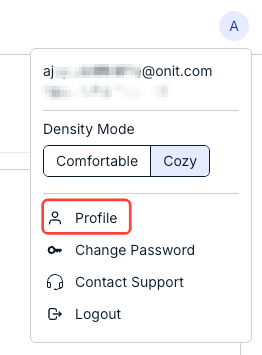
  1. Click on the upper-right-hand profile icon and click on "Profile."


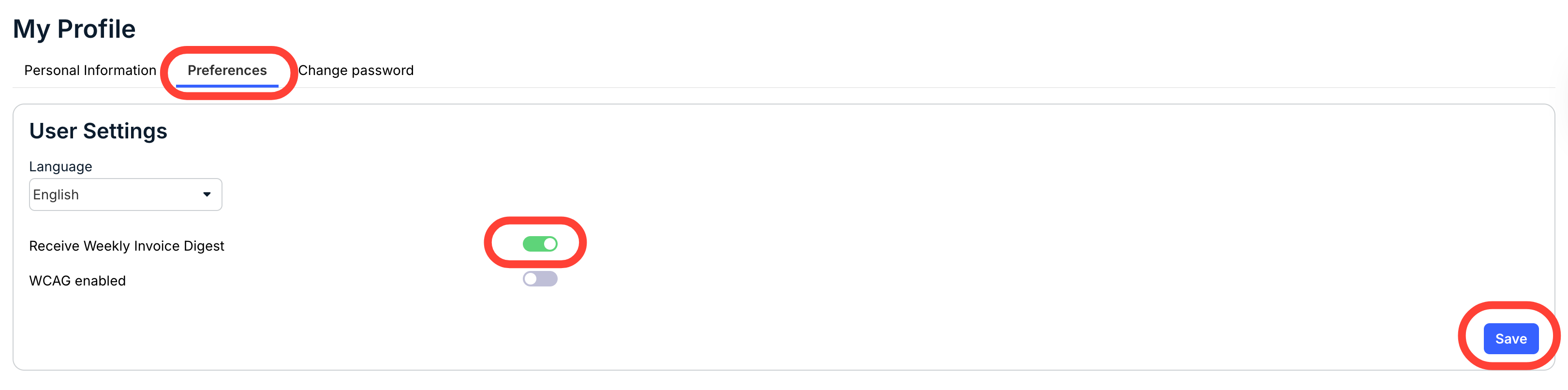
  2. Click on the "Preferences" tab and toggle the "Receive Weekly Invoice Digest" button to enable/disable the digest.

    Click Save to finalize your changes. 

Previous Article Resetting a Password in Counsel Exchange
Next Article Changing the Language in Counsel Exchange

© 2025 Onit, Inc.

docs.onit.com contains proprietary and confidential information owned by Onit, Inc. that is subject to copyright. Onit presents it exclusively to you for your sole use in conjunction with using Onit products. No portion of the materials contained herein may be used for any other purpose. No portion of the materials contained herein may be shared with third parties or reproduced in any form.