Available On Release
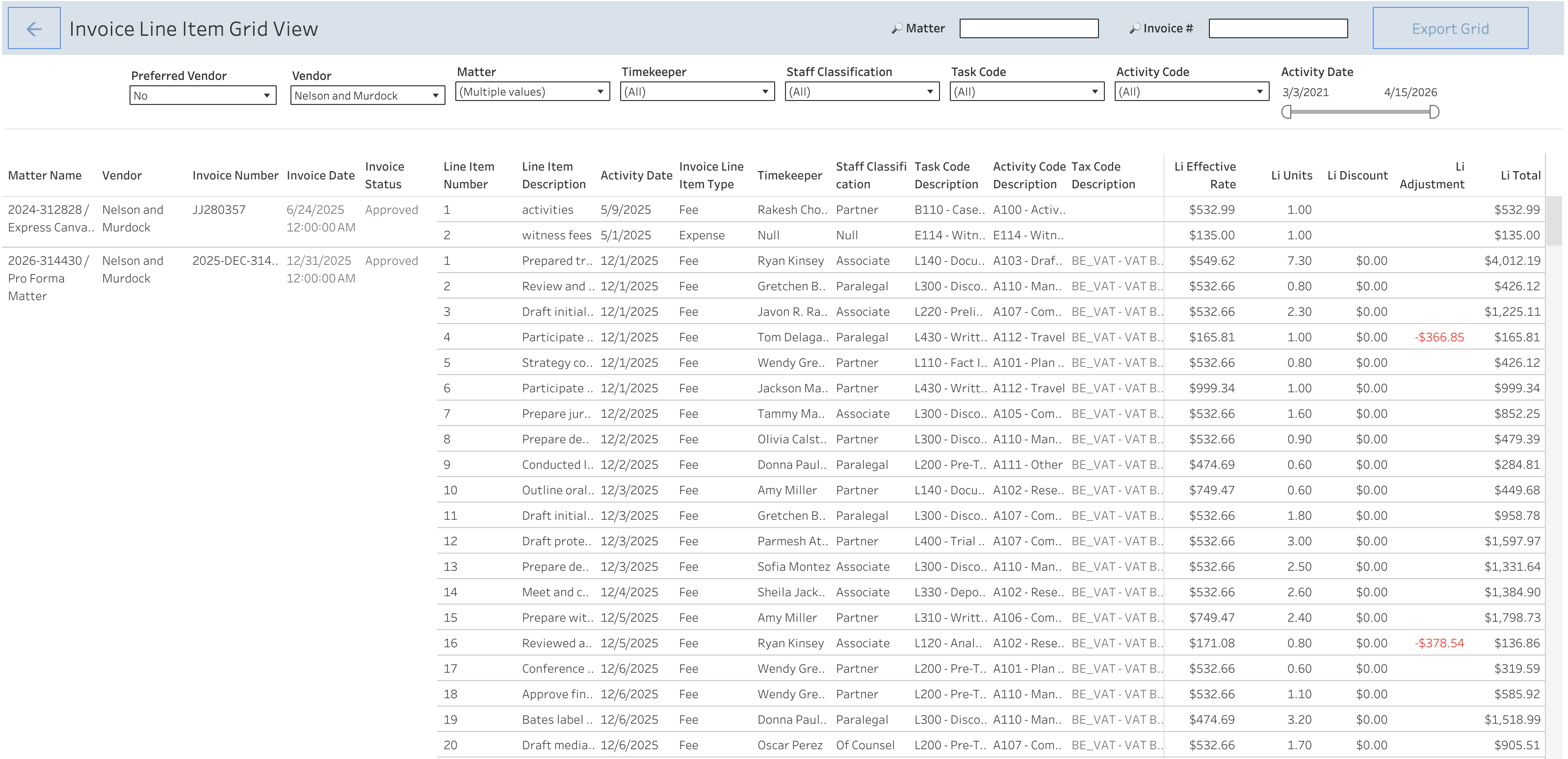
- Tableau Reports Invoice Line Items Grid View:
- Users can access the Invoice Line Items View by clicking the "View Invoice Line Items” button placed at the bottom of the Spend Suite Template.
- Invoice Line Items Grid View offers a comprehensive display of all invoice line items contributing to overall spend with a detailed breakdown of line item details.
- Use "Matter Search" and "Invoice Search" coupled with filters to swiftly retrieve spending associated with matters or invoices of interest.
- Clicking on “Export Grid" allows users to export the Line Item Grid in an Excel or CSV format for further data analysis.
Configuration Required
Enhancements
- Released the Vendor Communication app, allowing ELM users to message one or more vendors directly via ELM. Learn more in the Vendor Communication user guide.
Issues Resolved
- In Budget Reforecast, once the submission window expires, the budget and budget detail phases now match in both AB and BillingPoint.
- In Budget Reforecast, when the reforecasted budget is submitted without any changes, the phase now remains Approved instead of changing to Pending Approval.
- In Invoices, after changing the currency in Vendor Assignment to Matter (VATM), the Current Currency and Invoice Count fields now populate properly.
- In Accruals, the accruals banner now displays on the VATM if the matter/VATM is closed, but the Billing Authorization Request (BAR) is still open.
- After updating an office address in BillingPoint, the office now properly updates in ELM.
- An appealed invoice record now stays in the proper Pending Invoice Approver 1 phase instead of Pending Initial Invoice Approver, with an email alert only sent to the next approver (instead of both the next and prior approver).
- Users can no longer update the reforecast submission window if there is an active reforecast process.
- Upon approval of a pro forma invoice in ELM, the system will now send only one email to vendor contacts.
- Minor text revisions to the pro forma invoice rejection email copy.
- Fixed overlapping text in the disputed Matter-Level Timekeepers (MLTK) email.
- BillingPoint vendor options are now hidden for manual vendors on the Vendor Assignment form.
- Resolved an issue when (after an approved BAR test), the VATM with an MLTK fee arrangement throws an error upon reopening.
- Fixed a specific client error that occurred when approving an invoice.
- Delete budget option removed for external budgets, as deleting an external budget causes issues for vendors.
- After deletion of an internal budget, the user is no longer blocked from adding a new internal budget.
- When Invoice Currency is updated on a Vendor's Assignment to a Matter, and there is an existing External Budget, the budget now gets linked to the new Billing Authorization; in this situation, the Total Spend on the Budget in BillingPoint also now gets updated.
Known Issues
- When two values are updated simultaneously after initial setup on Budget Settings, an error occurs.
- Months of cloned fiscal years refer to the wrong fiscal year.
- The Early Payment Discount email is displaying wrong amounts.
- Once the 1st reforecast for the period cadence is triggered, the consecutive reforecasts are not properly triggered (specific to Period cadence).
- An invoice raised after currency change is getting linked with the old closed budget instead of the new budget.