Onit’s Unity Legal Service Requests (LSR) solution provides customers with a standardized, out-of-the-box intake flow when other teams/departments need help or support from your legal department. This can be anything from general legal and policy questions to requests for contract reviews or patentability investigations.
By using Unity LSR, requesters and approvers get a lightweight process to consistently capture requests, streamline assignment, and track status/aging without having to leave the Unity platform.
Once activated, you can use the link on the left-side navigation menu to switch to Legal Service Requests.
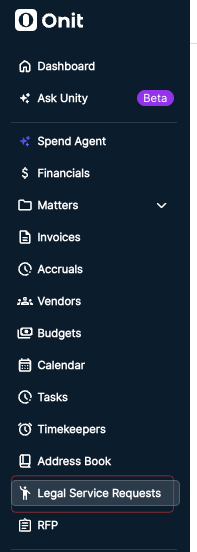
To deploy this solution to your organization, we recommend doing the following from the Settings page:
- Add any tags for further categorization and filtering of service requests
- Define the languages your organization supports for service requests
- Add users and assign relevant LSR roles (e.g., Business Requester or Intake Admin)
Out-of-the-Box Intake Forms
When submitting requests, users can select a wide range of built-in templates, including:
- NDA: For generating a company NDA or requesting review of a third-party NDA.
- Contract Review: For review/redlining of third-party/counterparty templates (e.g., MSA, SOW, etc.).
- Contract Generation: For drafting of contracts from approved templates (e.g., MSA, SOW, etc.).
- Contract Change: For amendment, renewal, extension, termination, or addendum of a contract.
- Vendor/Privacy (DPA or Online Terms): For handling of DPAs and acceptance of vendor click-through terms related to data processing.
- Marketing/Communications Review: For legal/brand review of campaigns, copy, PR announcements, web content, and/or event assets.
- Policy/Compliance Question: For guidance on internal policies or regulatory interpretation.
- General Legal Question: For all simple legal questions when no other type applies.
- Signatory/Authority Request: For determining signing authority or requesting supporting corporate documents (e.g., secretary’s certificate, PoA, etc.).
- Claims: For reporting or managing demands, disputes, litigation, subpoenas, regulatory inquiries, or threatened legal action by or against the company.
- Employment Request: For employment-related legal support (e.g., offer letters, separation agreements, contractor agreements, workplace investigations, accommodations, immigration).
- Insurance Request: For certificates of insurance, coverage questions, policy review, or tendering claims to carriers.
- Intellectual Property Request: For trademark, copyright, patent, or licensing matters (e.g., clearance searches, filings, open-source use, infringement concerns).
- Legal Operations Request: For outside counsel engagement, legal budgets/invoices, legal technology, knowledge management, or process improvements within the legal function.
- Product Legal Review: For legal review of new products, features, pricing, terms of service, or go-to-market plans prior to launch.
- Third-party NDA: For review and negotiation of an NDA on a counterparty's template.
Intake Flow & Statuses
When a requester submits a form, admins are notified via email and can access the pending request from their dashboard. A request can go through the following phases depending on its type and required action:
| Phase | Pending Action/Description | User Role(s) |
|---|---|---|
| Legal Triage (i.e., In Triage status) | Request goes through review for handoff to an assignee (e.g., Intake Admin or Legal Analyst/Attorney) to start work. Assignee can continue with the request or take other actions, such as putting the request on hold or requesting additional information to move forward. | Intake Admin |
| In Progress | Work is being completed by the assignee. Depending on next steps or required action, this can be changed to any of the following statuses: Waiting on Requester, On Hold, Completed, or Canceled. | Legal Analyst/Attorney |
| Waiting on Requester | Indicates that additional information is required from the requester, such as attachments, responses to questions, or other details as specified by the assignee. Depending on next steps, this can be changed to any of the following statuses: In Progress or Canceled. | Business Requester |
| On Hold | Indicates that work has been paused due to a blocker or another dependency. Assignee must provide a waiting reason, and the requester is notified. | Legal Analyst/Attorney |
| Completed | Indicates that the work has been completed by the assignee. Once marked as completed, the request can be reopened or a follow-up can be requested. | Intake Admin or Legal Analyst/Attorney |
| Canceled | Requests in any phase can be canceled by the requester or an assignee/admin. Canceled requests can be reverted to In Triage or In Progress. | Intake Admin, Legal Analyst/Attorney, or Business Requester |