1. Select Master Settings under the client dropdown.

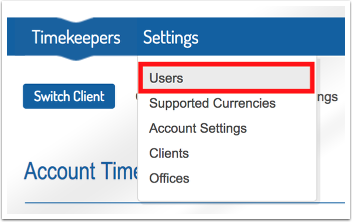
2. Under the settings tab, go to Users.
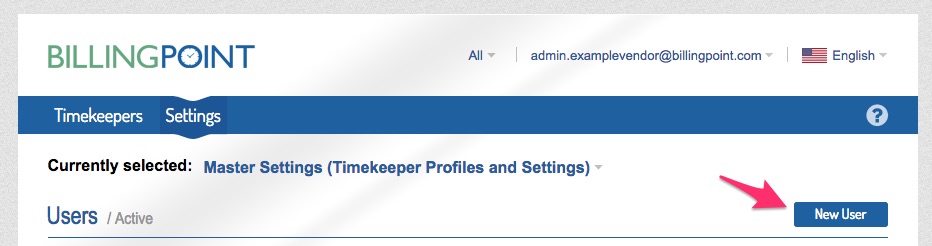
3. Click on New User.
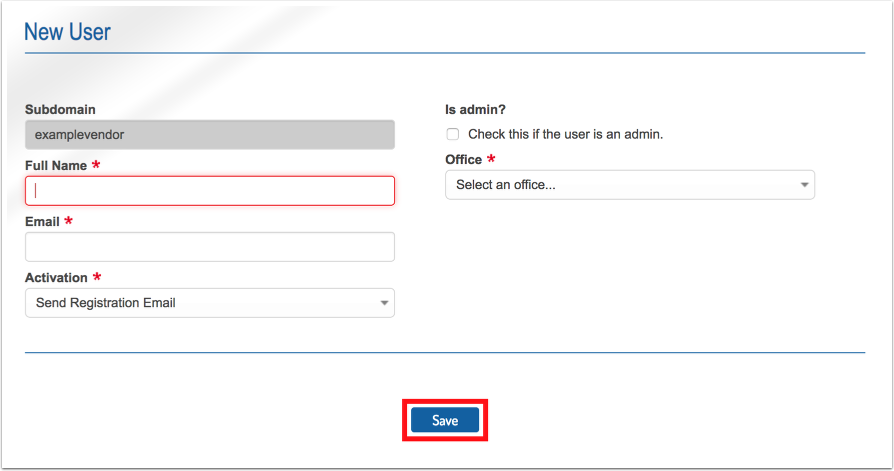
4. Complete the New User form and click Save.
Updated on
1. Select Master Settings under the client dropdown.
2. Under the settings tab, go to Users.
3. Click on New User.
4. Complete the New User form and click Save.
© 2026 Onit, Inc.
docs.onit.com contains proprietary and confidential information owned by Onit, Inc. that is subject to copyright. Onit presents it exclusively to you for your sole use in conjunction with using Onit products. No portion of the materials contained herein may be used for any other purpose. No portion of the materials contained herein may be shared with third parties or reproduced in any form.